BrassRing ATS new features for release 26.07.14 are listed here.
BrassRing ATS Dark Launch
Dark Launch features are those that are released to the Staging environment only and are NOT released to the Production environment for a considerable amount of time.
This process gives an opportunity and enough time to test these features thoroughly before they are available in the production environment. Clients are requested to configure and test these features and provide their feedback and inputs to your respective Signal Labs Talent representatives.
There are no Dark Launch features in this release.
BrassRing ATS VISIBLE CHANGES
The BrassRing ATS visible changes for the current release are listed here.
Responsive Recruiter: Preview Posting
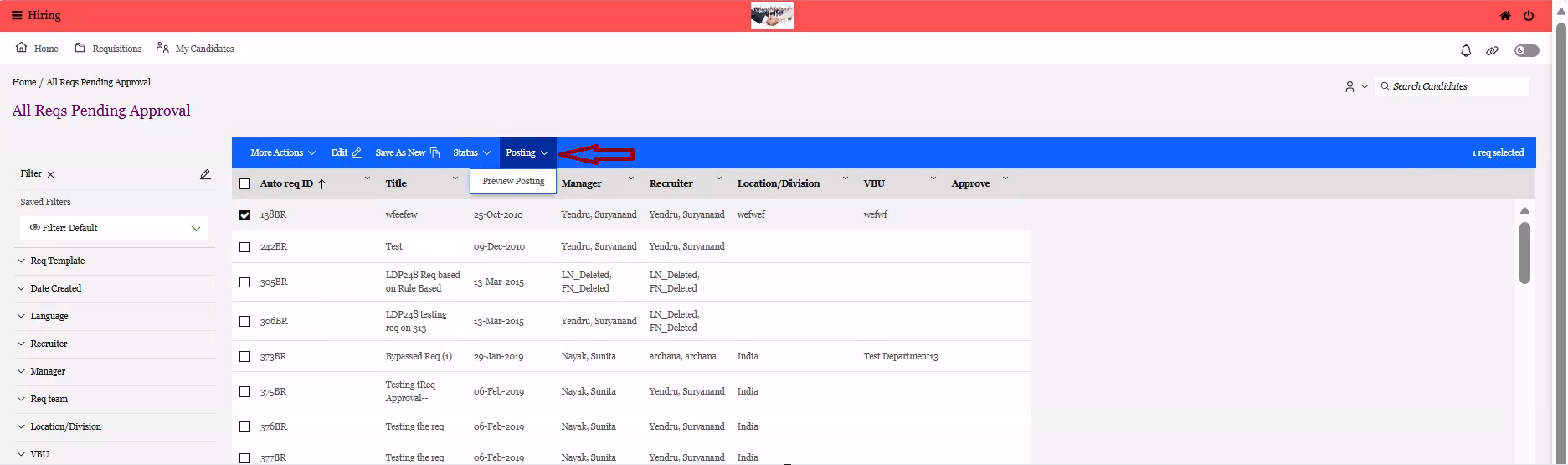
It has been noted that the "Posting" button, which displays the "Preview Posting" option, was not available on the blue menu bar when users attempted to view the All/My Reqs sections for Pending and Approved requisition statuses in the New UI.
With this release, this has been addressed, and the "Posting" button that shows the "Preview Posting" option is now accessible in the New UI.
Path: BrassRing ATS >> Hamburger >> Reqs >> View all or View My Reqs >> Pending or Approved >> Select the Req >> Posting >> Preview Posting
Internal Reference Azure Board # 64925.
Responsive Recruiter: Export Candidates
It has been observed that when a BrassRing ATS user attempts to export a candidate list, only the candidates displayed on the current grid page are included, with a maximum limit of 50 candidates. If there are multiple pages of candidates, each page must be exported separately, which is not a user-friendly experience.
With this release, the export functionality has been enhanced to include all candidates selected across all pages, rather than limiting the export to only those displayed on the currently active grid page.
Example: In the screenshot below, all 153 candidates selected across four pages can be exported to Excel.
.png)
Internal Reference Azure Board # 65085.
Talent Gateway: Suggest Matching Roles
Starting with this release, when the client setting “Enable Smart Indexing (Jobs & Resumes)” is enabled for any client, a new Talent Gateway setting, “Suggest Matching Roles,” has been introduced in the responsive layout of the Talent Gateway within the Workbench application. This setting can be found under the “Welcome / Search” section.
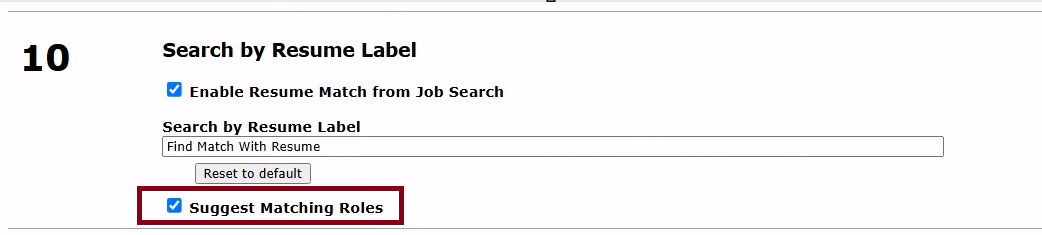
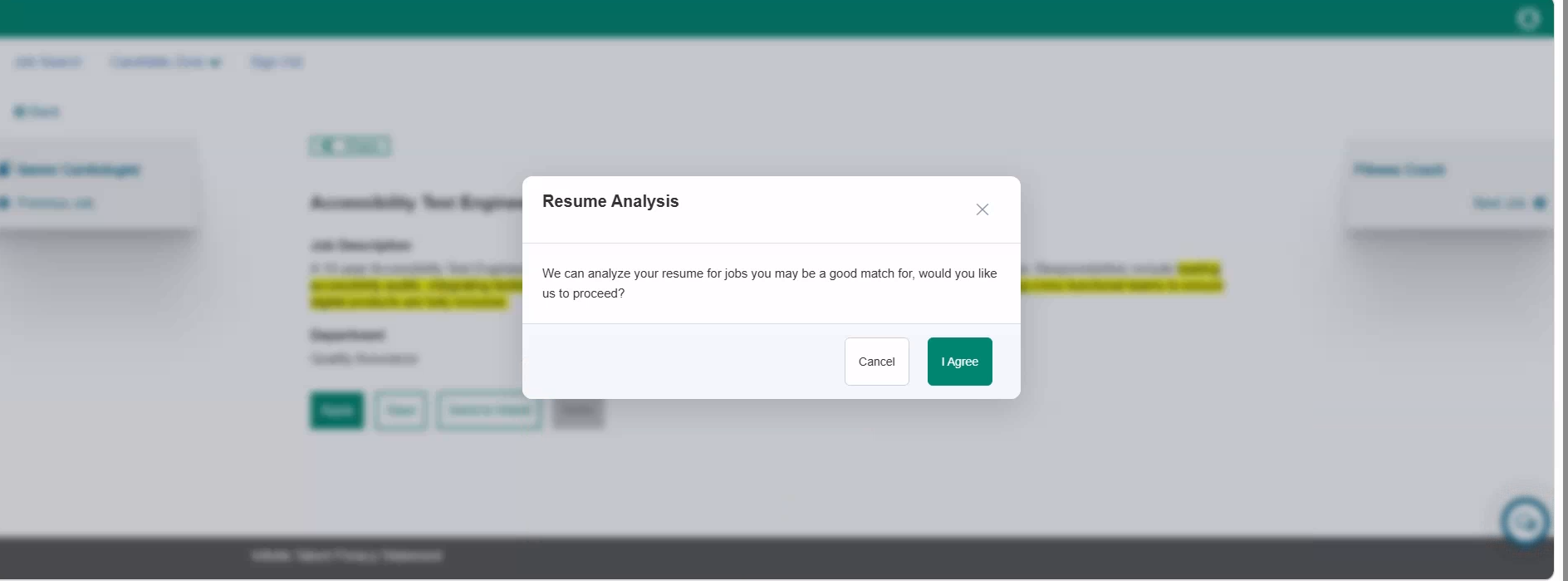
When the Workbench Admin enables this setting, candidates who are logged into the Talent Gateway and attempt to search for and apply for a job can see a pop-up message: “We can analyze your resume for jobs you may be a good match for. Would you like us to proceed?” If the candidate clicks “Yes,” they receive suggestions dynamically for job opportunities that better align with their experience, skills, and career level.
If the candidates are interested in the displayed jobs, they can continue applying; otherwise, they can continue with the original role they were applying for.
Disclaimer: If you are interested in enabling these features in production, due to data sharing, Signal Labs Talent requires sign-off from the customer. For additional information, please reach out to CSM.
Internal Reference Azure Board # 55494.
Data Insight Tool: Stop Ad hoc Report
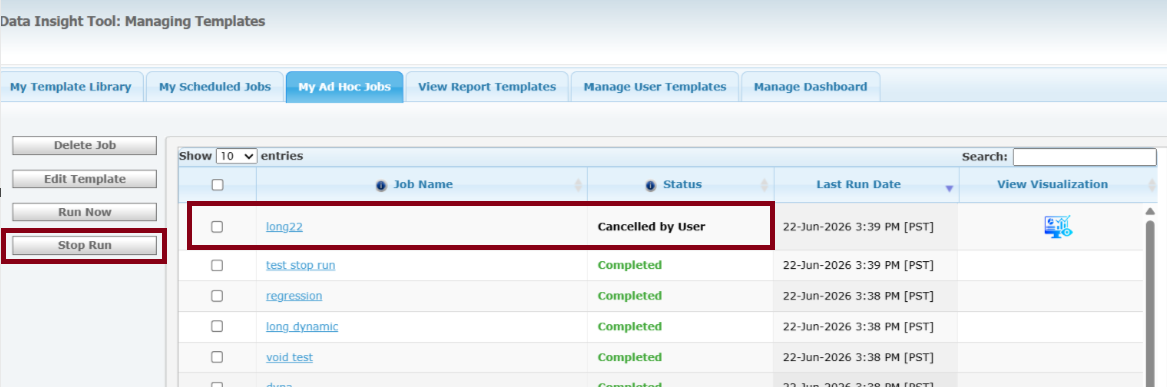
With this release, a new button labelled "Stop Run" has been introduced in the "My Ad Hoc Jobs" tab. This feature allows users of the Data Insight Tool to stop an Ad Hoc report if they realize they need to make changes or remove something.
Understanding that some reports may take a while to run, this option enables users to halt the current run, make necessary updates, and then execute the report again without having to wait for the initial run to finish.
If a run is stopped before completion, its status displays as "Cancelled by User." Users can stop multiple Ad Hoc reports or run them as needed.
Internal Reference Azure Board # 62754.
Data Insight Tool: Talent Gateway Postings Output Field
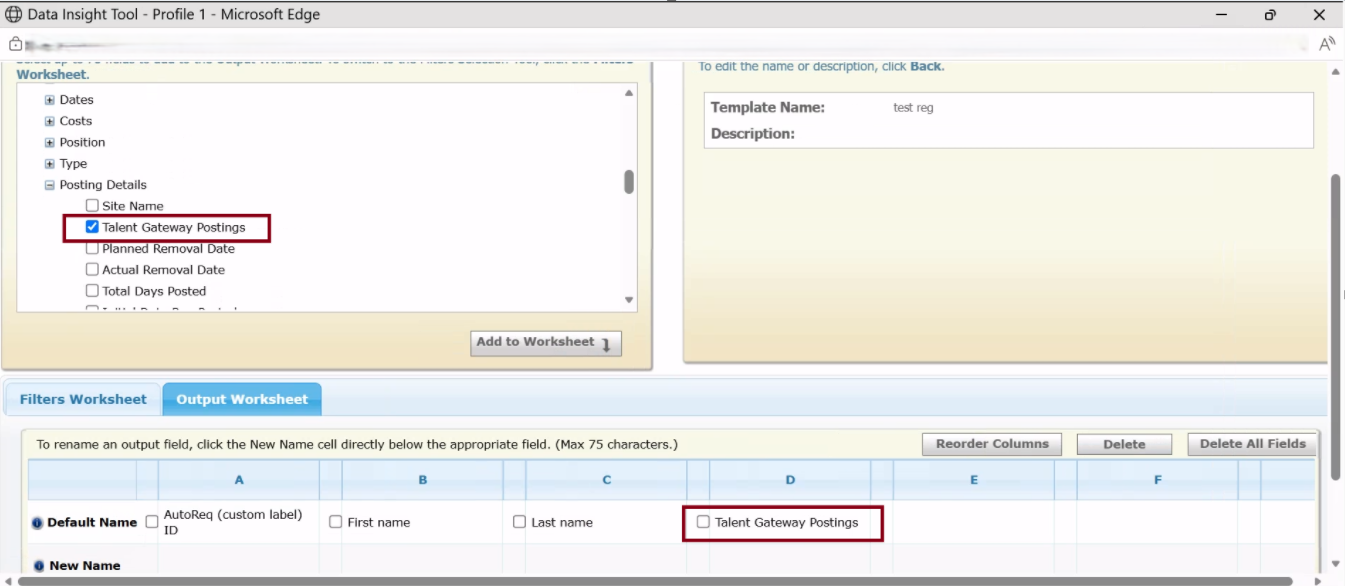
With this release, users of the Data Insight Tool can now add a new output field labelled “Talent Gateway Postings.” This feature allows for the generation of a consolidated report that displays where each requisition was posted, along with the total duration for each Talent Gateway, all in a single row with comma-separated values.
This implementation simplifies the analysis of requisition posting and hiring data by eliminating the need for multiple rows of records. The total number of days a requisition is posted per Talent Gateway, including both initial and reposted days, is aggregated and clearly presented.
Example: Internal TG Name (10 days), External TG Name (15 days)
Path: BrassRing ATS >> Hamburger >> Reports >> Data Insight Tool >> Manage Templates >> Create/Edit a report >> In the “Output Selection Tool”, expand “Requisitions” >> Posting Details >> Select “Talent Gateway Postings” >> Add to Worksheet
Internal Reference Azure Board # 64657.
Data Insight Tool: SMS Consent and Phone Number
Currently, when candidates or leads create their profiles through the Talent Gateway or BrassRing Lead Manager landing pages, they are asked the question, “Would you like to receive text messages about jobs?” with the options “Yes” and “No.” However, this consent information is not currently reportable via the Data Insight Tool.
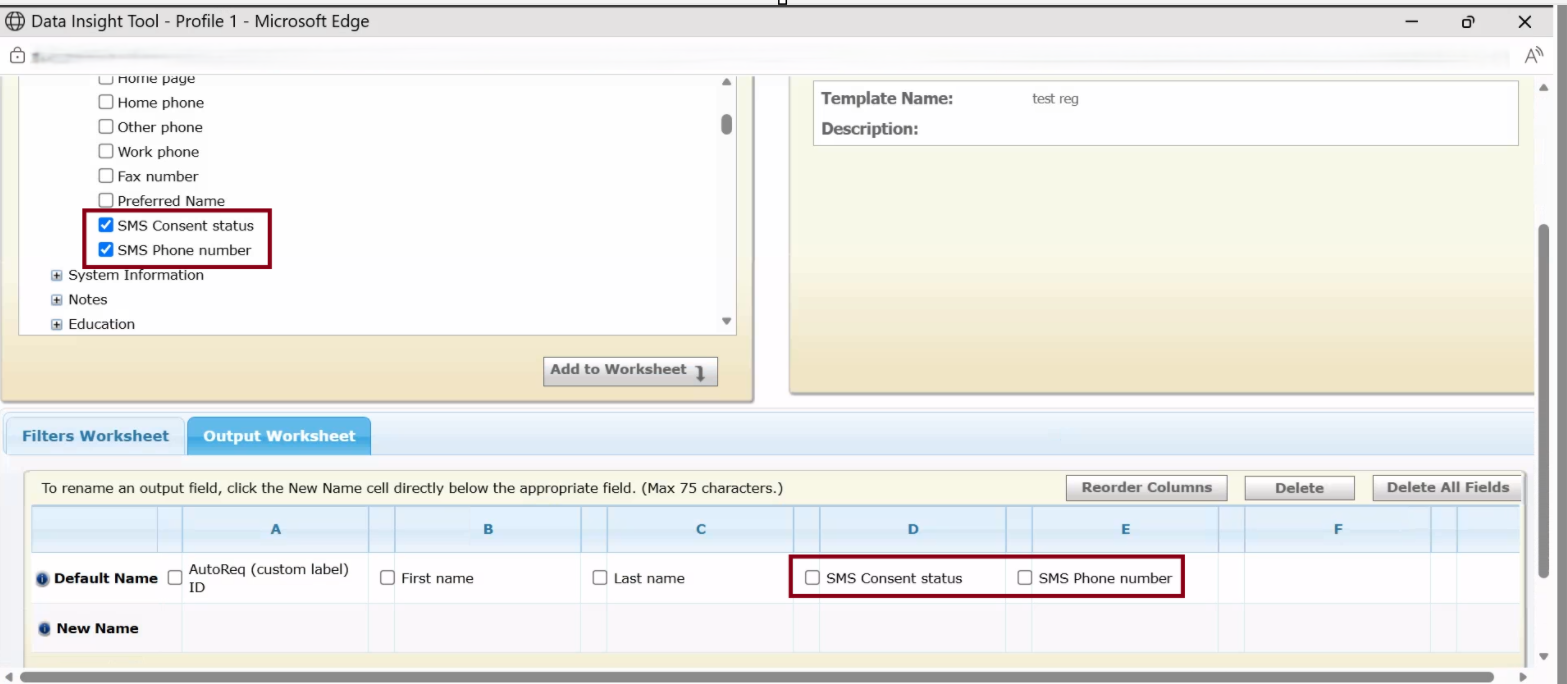
With this update, users of the Data Insight Tool can now include the fields “SMS Consent Status” and “SMS Phone Number” in their reports from the following functional areas. This enhancement allows for better tracking of communication consent preferences, ensuring compliance and improving operational efficiency.
Candidate >> Contact Info Functional Area
SMS Consent Status - (Can be added in both Filters and Output Worksheet)
SMS Phone Number - (Can be added only in Output Worksheet)
BrassRing Lead Manager >> Lead Functional Area
SMS Consent Status - (Can be added in both Filters and Output Worksheet)
SMS Phone Number - (Can be added only in Output Worksheet)
Internal Reference Azure Board # 65945.
Agency Manager: Polish Locale
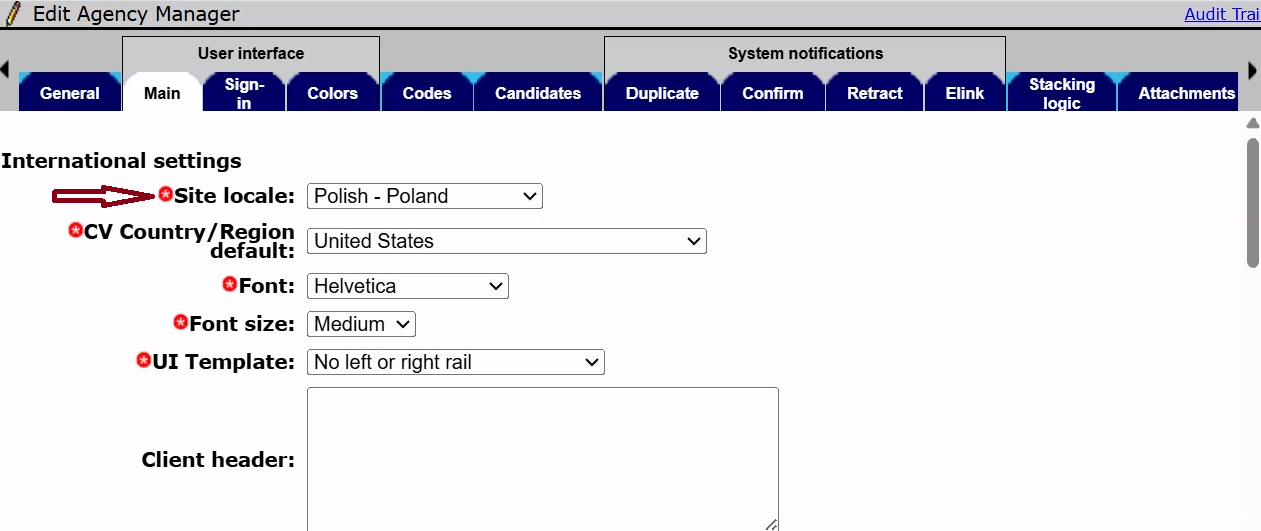
Starting with this release, the Polish Locale is now available and supports the Agency Manager. This enhancement allows recruiters and agency users involved in Poland operations to configure and use Agency Manager in Polish.
Note: The client should have purchased the Polish language, and the "Polish" locale must be enabled in the client settings under "Agency Locales."
Path: Workbench >> Tools >> Agencies >> Try to add or edit an Agency Manager >> Click on the “Main” tab >> Site Locale >> Polish - Poland
Internal Reference Azure Board # 66468.
BrassRing ATS CONFIGURABLE CHANGES
There are no BrassRing ATS configurable changes for the current release.
BRASSING WORKBENCH CHANGES
The Workbench-related configuration changes in the current release are mentioned in the Visible Changes section.