BrassRing new features for release 26.06.16 are listed here.
BRASSRING Dark Launch
Dark Launch features are those that are released to the Staging environment only and are NOT released to the Production environment for a considerable amount of time.
This process gives an opportunity and enough time to test these features thoroughly before they are available in the production environment. Clients are requested to configure and test these features and provide their feedback and inputs to your respective Infinite representatives.
There are no Dark Launch features in this release.
BRASSRING VISIBLE CHANGES
The BrassRing visible changes for the current release are listed here.
Responsive Recruiter: Automatically Unpost/Repost Requisitions
Beginning with this release, a new client setting called “Enable Auto Unpost/Repost for Requisitions” has been introduced. This setting is set to ‘No’ by default in the Workbench application. When this setting is enabled, BrassRing users can configure rules based on applicant count or status that automatically unpost or repost requisitions based on various conditions.

A new custom requisition field called “Auto Unpost/Repost Rule” has been introduced and must be added to the requisition template. This is a single-select field, and its options/rules can be configured by selecting a new action titled “Configure Req Auto Post” under the ‘Actions’ menu on the Req forms page in the Workbench application.
Path: Workbench >> Tools >> Forms >> Req Forms >> Actions >> Configure Req Auto Post >> Create Rule Set
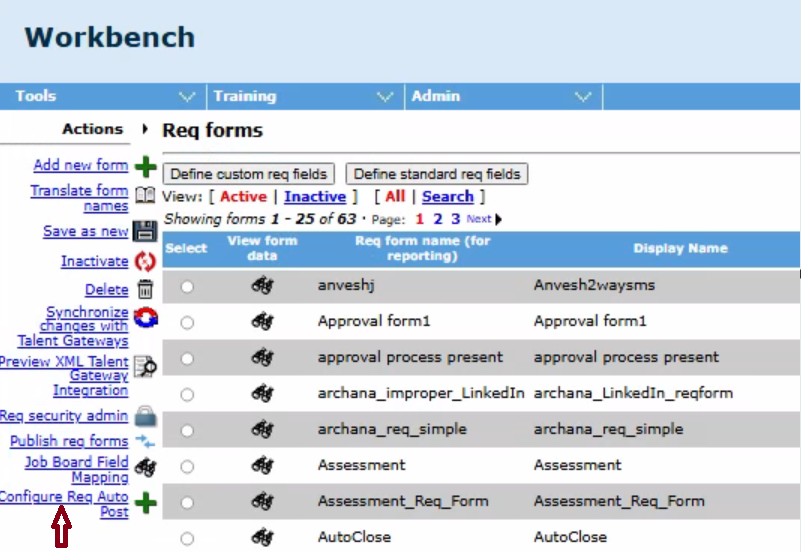
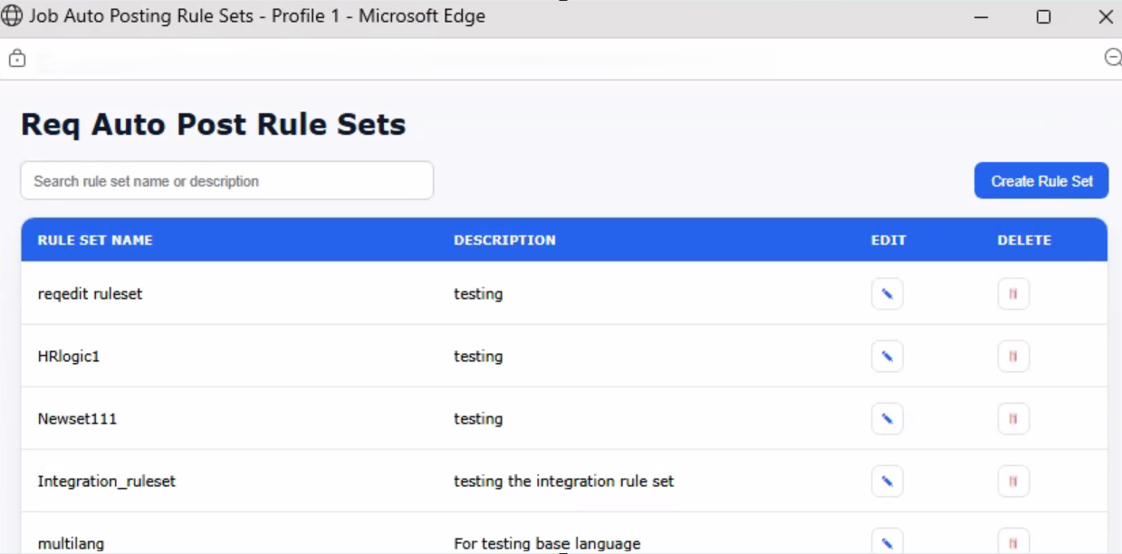
Workbench admins can create, edit, and delete rule sets as needed. Each rule set consists of two sections that can be configured according to the client’s business requirements.
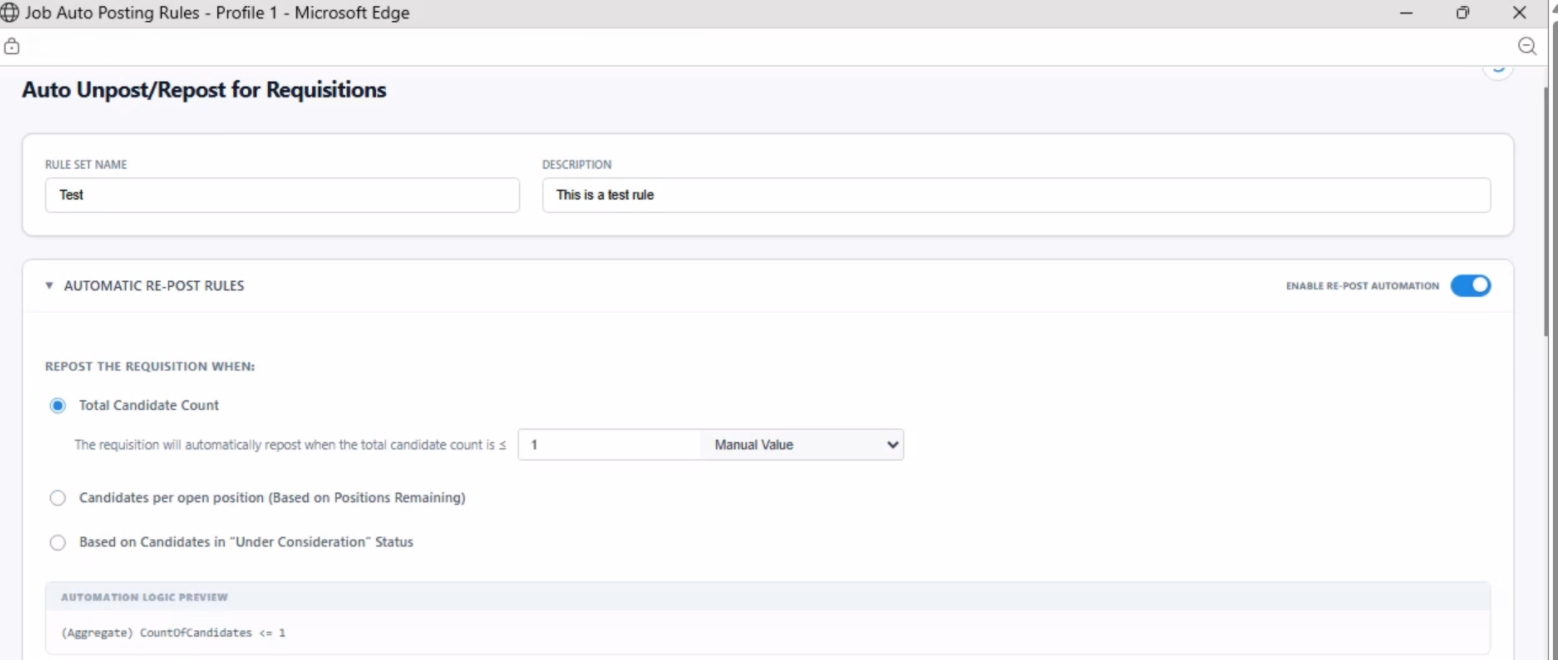
AUTOMATIC RE-POST RULES: The user can configure one of the three conditions and validate it with a numeric value manually or by selecting a requisition field for validation.
Repost the Requisition when:
• Total Candidate Count - The requisition will automatically repost when the total candidate count is ≤
• Candidates per open position (Based on Positions Remaining) - The requisition will automatically repost when the candidate count per open position is ≤
• Based on Candidates in “Under Consideration” Status
HR STATUS:
a) Total Candidate Count Under Consideration - The requisition will automatically repost when the total candidate count in Under Consideration is ≤
b) Candidates Under Consideration Per Open Position - The requisition will automatically repost when the candidate count in Under Consideration per open position is ≤
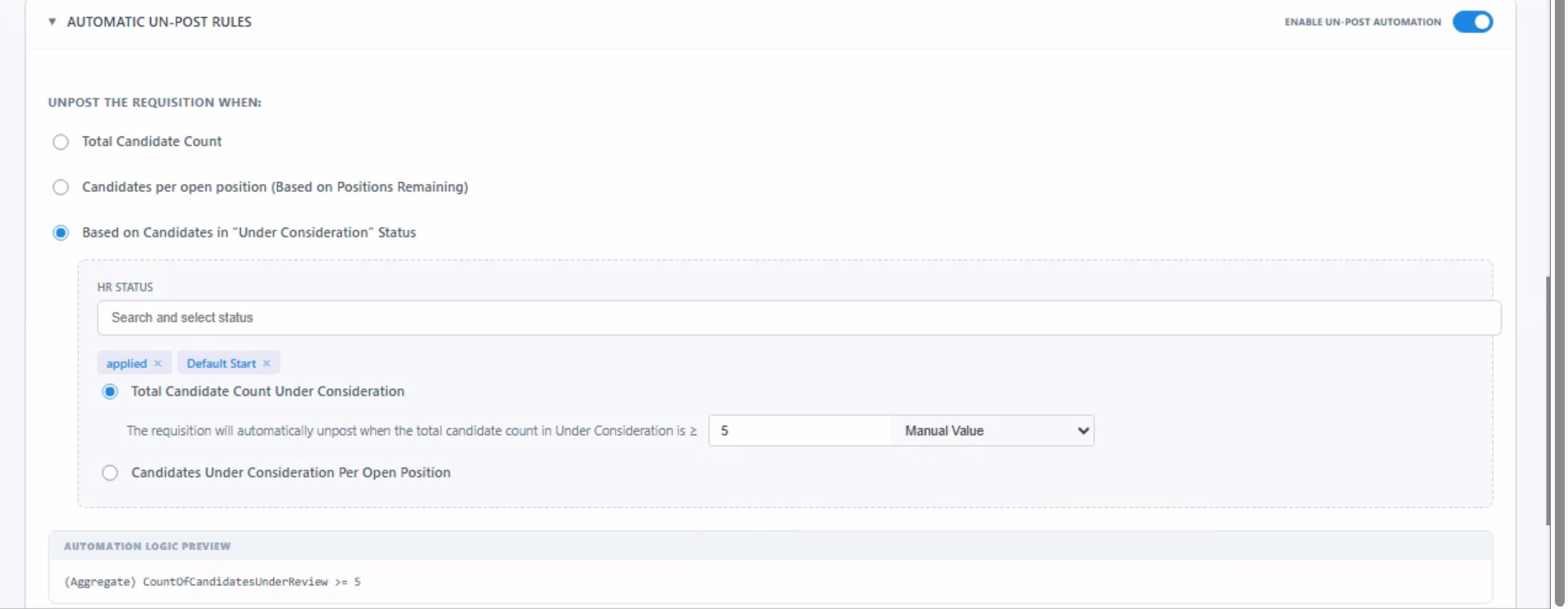
AUTOMATIC UN-POST RULES: The user can configure only one of the three conditions and has the ability to validate it with a numeric value manually or by selecting a requisition field for validation.
Unpost the Requisition when:
• Total Candidate Count - The requisition will automatically unpost when the total candidate count is ≥
• Candidates per open position (Based on Positions Remaining) - The requisition will automatically unpost when the candidate count per open position is ≥
• Based on Candidates in “Under Consideration” Status
HR STATUS:
a) Total Candidate Count Under Consideration - The requisition will automatically unpost when the total candidate count in Under Consideration is ≥
b) Candidates Under Consideration Per Open Position - The requisition will automatically unpost when the candidate count in Under Consideration per open position is ≥
BrassRing users can choose a rule set in the “Auto Unpost/Repost Rule” field on the requisition form. This selection allows the configured conditions in the rule set to be validated for performing the specified actions, such as unposting and reposting requisitions from the Talent Gateways.
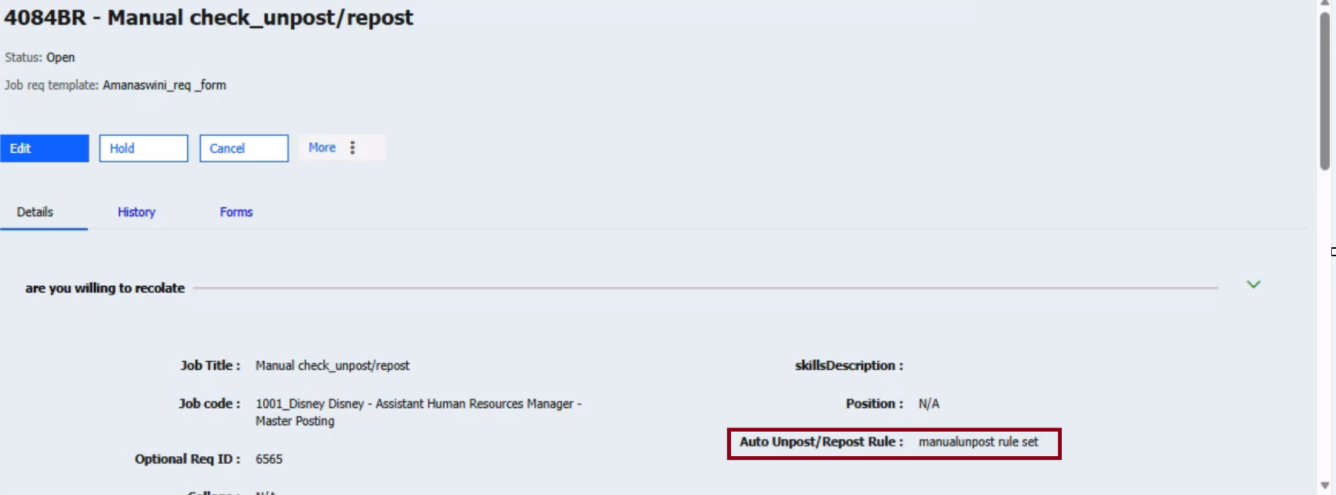
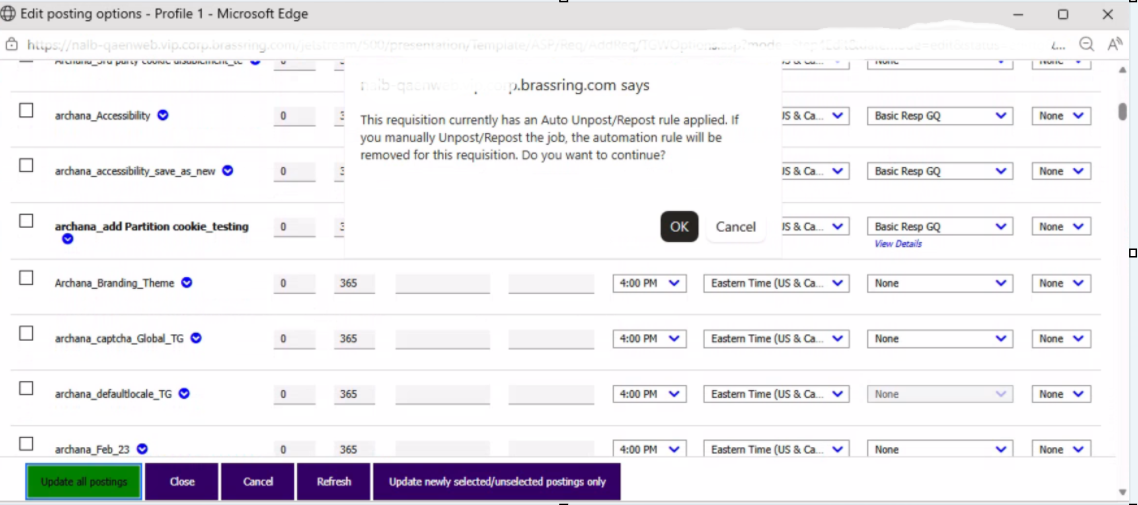
If a user attempts to manually unpost a requisition that has an Auto Unpost/Repost rule applied, a message appears indicating that the automation rule will be removed for this requisition.
Internal Reference Azure Board # 49801.
Responsive Recruiter: Talent Record - Attachments
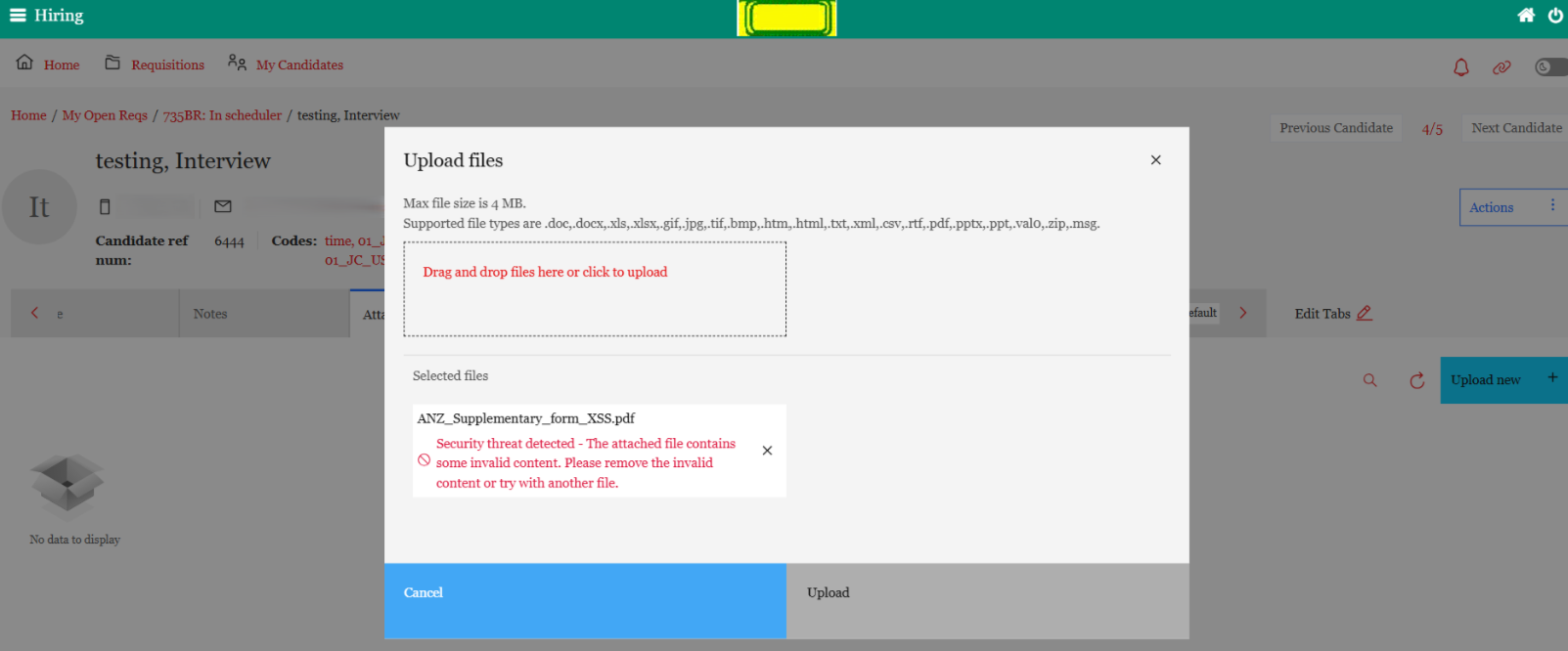
With this release, the New UI prevents BrassRing users from uploading PDF files that contain JavaScript markers from the ‘Attachments’ tab on the candidate talent record. This restriction is in place to address security concerns.
Internal Reference Azure Board # 65094.
Responsive Recruiter: Posting Partners
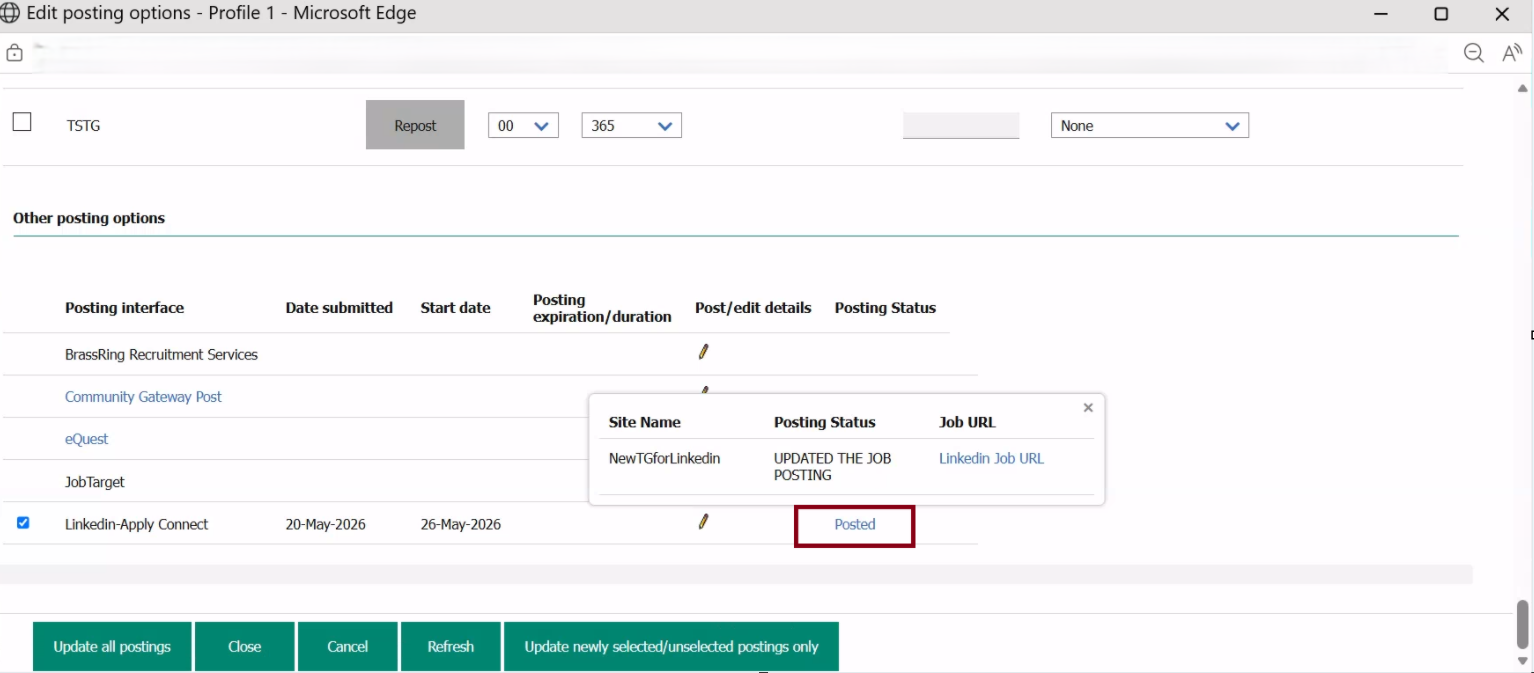
With this release, when a requisition is posted to partner vendors like LinkedIn and Job Target, users can click the “Posted” link under the “Other Posting Options” section to view all external job application URLs. The new pop-up page displays the site name, posting status, and job application URL for each external listing. This enhancement makes it easier for users to track, manage, and access job posting links for every requisition.
Internal Reference Azure Board # 62162.
Talent Gateway: BrassRing Privacy Policy
The BrassRing Privacy Policy is now translated into French and available on the French Talent Gateway. This allows clients to include it on their French Talent Gateways, ensuring compliance with local language requirements.
Internal Reference Azure Board # 65091.
Recruiter XML Integration: External Job Boards
With this release, we are introducing a generic and scalable Easy Apply integration framework that enables external Job Boards to securely import candidates into the BrassRing application. This solution allows candidates to apply directly from Job Board platforms, eliminating the need for custom development or code changes with each new integration. The framework provides interoperability, scalability, and a simplified onboarding process for future Job Board integrations.
This solution enables Job Boards to:
Fetch General Questions (GQ) dynamically in a standardized JSON response format.
Submit candidate application data securely into the ATS using generic Apply APIs.
Integrate with the platform without requiring custom implementation changes for each vendor onboarding.
To ensure secure communication and data protection:
RSA Public/Private Key encryption has been implemented for:
Questions API authentication and response validation.
Apply API request validation and secure candidate submission.
End-to-end encryption and security validation mechanisms are enforced during all API transactions.
For onboarding a new Job Board vendor:
1. The vendor must raise a maintenance/onboarding request.
2. A backend vendor configuration entry is created in the system.
3. The vendor is provided with a private key for secure API communication.
4. Once configured, the vendor can consume the generic APIs without further platform code changes.
Click this link Generic Candidate Apply Documentation for External Job Boards for detailed implementation and API integration documentation for reference, including:
• Authentication flow
• RSA encryption/decryption guidelines
• Questions API contract
• Apply API contract
• Vendor onboarding steps
• Sample request/response payloads.
Internal Reference Azure Board # 65864.
Workbench: Restrict Internal Email Domains
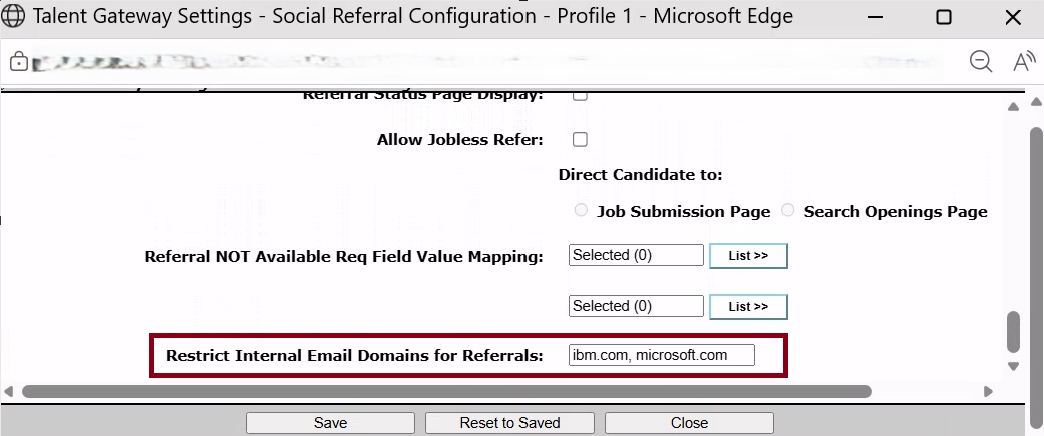
With this release, Workbench Admin users can now configure a list of restricted email domains. This update prevents internal employees from making referrals through the Social Referral feature on the referral talent gateway.
When employees attempt to refer candidates using internal email domains (such as the company's own domains), a validation message is displayed: "Referrals using company email addresses aren't allowed. Please use an external email."
Users can enter multiple domains as a comma-separated list.
Path: Workbench >> Tools >> Talent Gateways >> Social Referral TG >> Edit >> Social Referral Configuration Options >> Configure >> Restrict Internal Email Domains for Referrals >> Add the Internal Email Domains and Save the changes
Internal Reference Azure Board # 63716.
Workbench: Rules Automation Manager
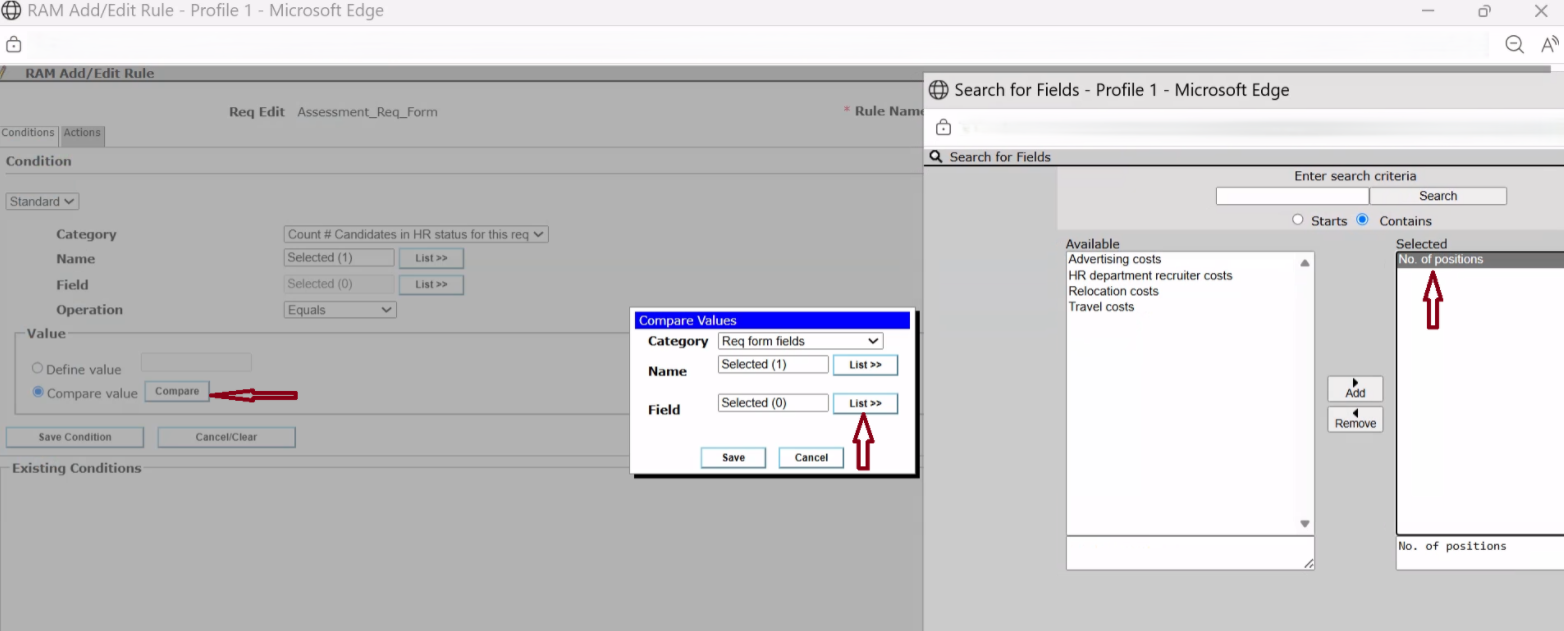
Starting with this release, Workbench Administrators can now configure the standard requisition field “Number of Positions” (Text type) within the “Compare Value” section when defining conditions for the category “Count # Candidates in HR Status for this Requisition.”
With the addition of support for this text-type field, users can compare the number of candidates in a specific HR status to the number of approved positions in a requisition, without needing to change the field type. This enhancement provides increased flexibility and simplifies the configuration process.
Internal Reference Azure Board # 63529.
BRASSRING CONFIGURABLE CHANGES
There are no BrassRing configurable changes for the current release.
BRASSING WORKBENCH CHANGES
The Workbench-related configuration changes in the current release are mentioned in the Visible Changes section.