BrassRing new features for release 26.05.19 are listed here.
BRASSRING Dark Launch
Dark Launch features are those that are released to the Staging environment only and are NOT released to the Production environment for a considerable amount of time.
This process gives an opportunity and enough time to test these features thoroughly before they are available in the production environment. Clients are requested to configure and test these features and provide their feedback and inputs to your respective Infinite representatives.
There are no Dark Launch features in this release.
BRASSRING VISIBLE CHANGES
The BrassRing visible changes for the current release are listed here.
Responsive Recruiter: Candidates filter in requisition
Currently, when filters are applied to the "Total" candidate count within a requisition, and the user attempts to filter by clicking on individual HR Status or Candidate Type counts, the previously applied filters remain active across all pages.
Starting with this release, this behaviour has changed so that the previously set filters are overridden when the user selects individual HR Status or Candidate Type counts, which ensures the filtered candidate data is displayed correctly.
If the user applies any additional filters within the individual HR Status or Candidate Type listings, these new selections replace the existing filters.
Example: When a user clicks on the "Phone Screen" HR Status count, the candidate list displays only those candidates in the "Phone Screen" status. The "Phone Screen" filter then appears in the applied filters list. If the user subsequently adds a filter for Candidate Type = "Internal," this is combined with the Phone Screen filter.
Please note that these filters persist in the total candidates flow but do not persist in the following scenarios:
1) Candidate search
2) Candidate quick search
3) Candidates in the queue
4) Candidates in referral
Internal Reference Azure Board # 62338.
Responsive Recruiter: Talent Record – Candidate Resume/CV
In the New UI, the candidate's resume/CV in the talent record is currently displayed in text format by default. Users can click the PDF icon to view or download the resume in PDF format.
With this release, the existing client setting called "Elink Dashboard - Resume Default View" has been renamed to "Elink Dashboard/Talent Record - Resume Default View." This change allows the resume to be displayed in PDF format by default in the candidate talent record, provided this option is enabled.

Internal Reference Azure Board # 52544.
Responsive Recruiter: Date Fields Configuration
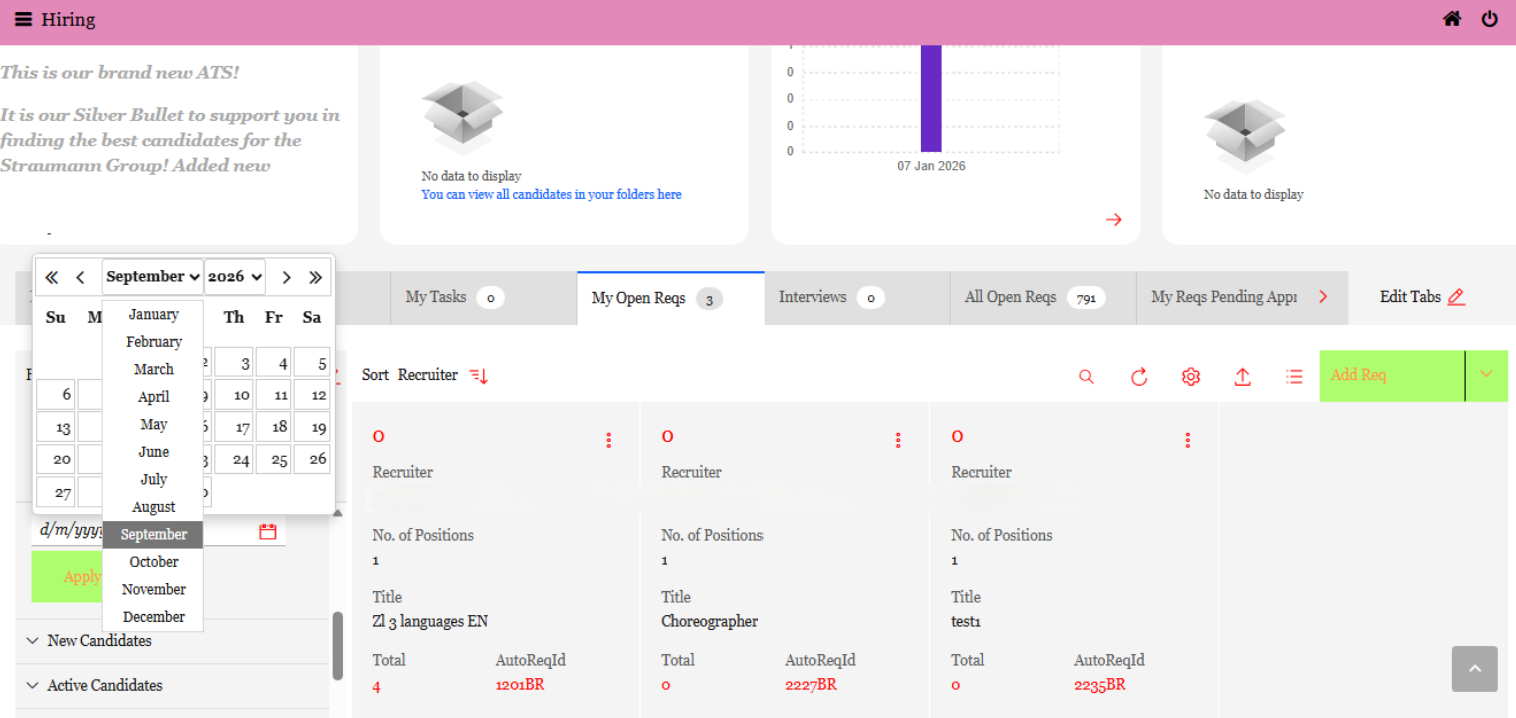
Users currently select a date field and click arrows repeatedly to navigate through the dates for selection in the BrassRing application, which is a tedious process.
With this release, the Date picker configuration has been enhanced. Users can now select the month and year from a dropdown menu, allowing for quicker date selection without the need to click through multiple arrows.
Internal Reference Azure Board # 62054.
Responsive Recruiter: Candidate Talent Record and Elinks
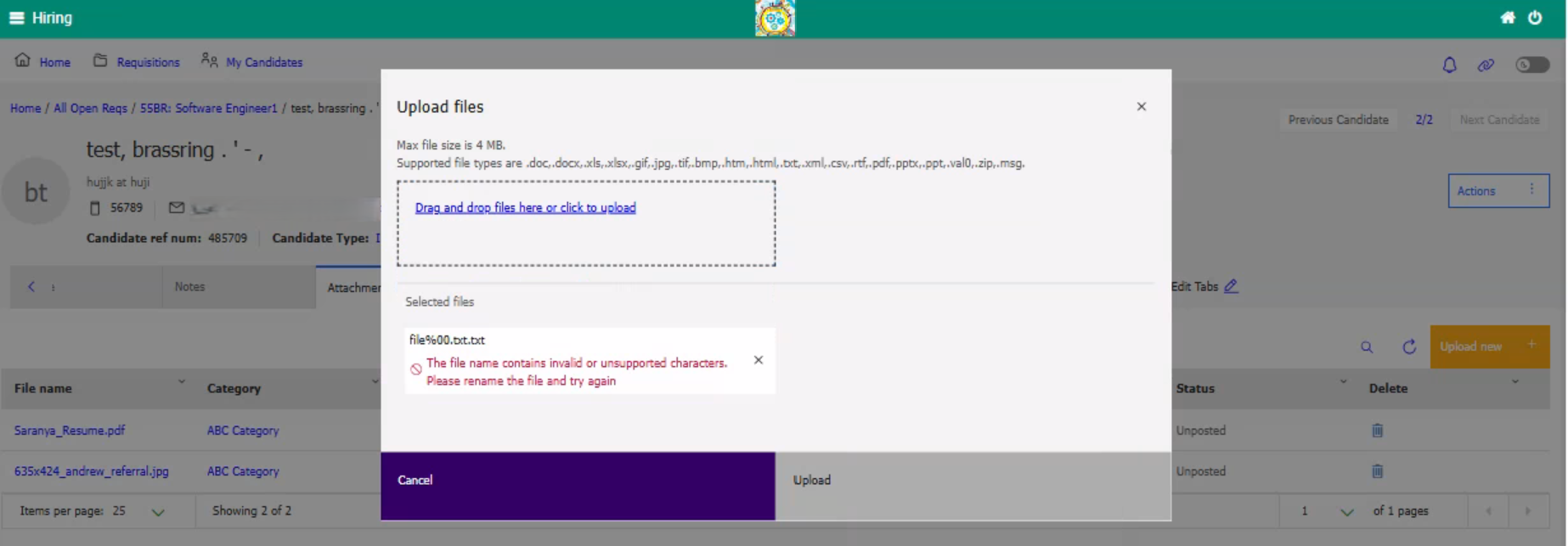
Unrestricted File Upload vulnerabilities can enable attackers to execute malicious code, compromising system security and allowing them to steal or manipulate sensitive data.
To address these vulnerabilities in this release, the system now displays a validation message when uploading files on the candidate talent record or elinks if the file name contains any of the following unsupported characters: “The file name contains invalid or unsupported characters. Please rename the file and try again.”
Special Characters:
? (Question mark)
< (Less-than sign)
> (Greater-than sign)
\ (Backslash)
/ (Forward slash)
% (Percentile)
# (Hash)
* (asterisk)
Encoded Characters (not limited):
%252e (Double encoded dot)
%20 (Encoded space)
%2e (Encoded dot)
%00 (Null byte)
Unicode Dot Like Characters and Other invisible Characters:
file。doc
file.pdf
file․exe
file..txt (multiple dots)
Internal Reference Azure Board # 62890.
Talent Gateway: Most Recent Work Experience
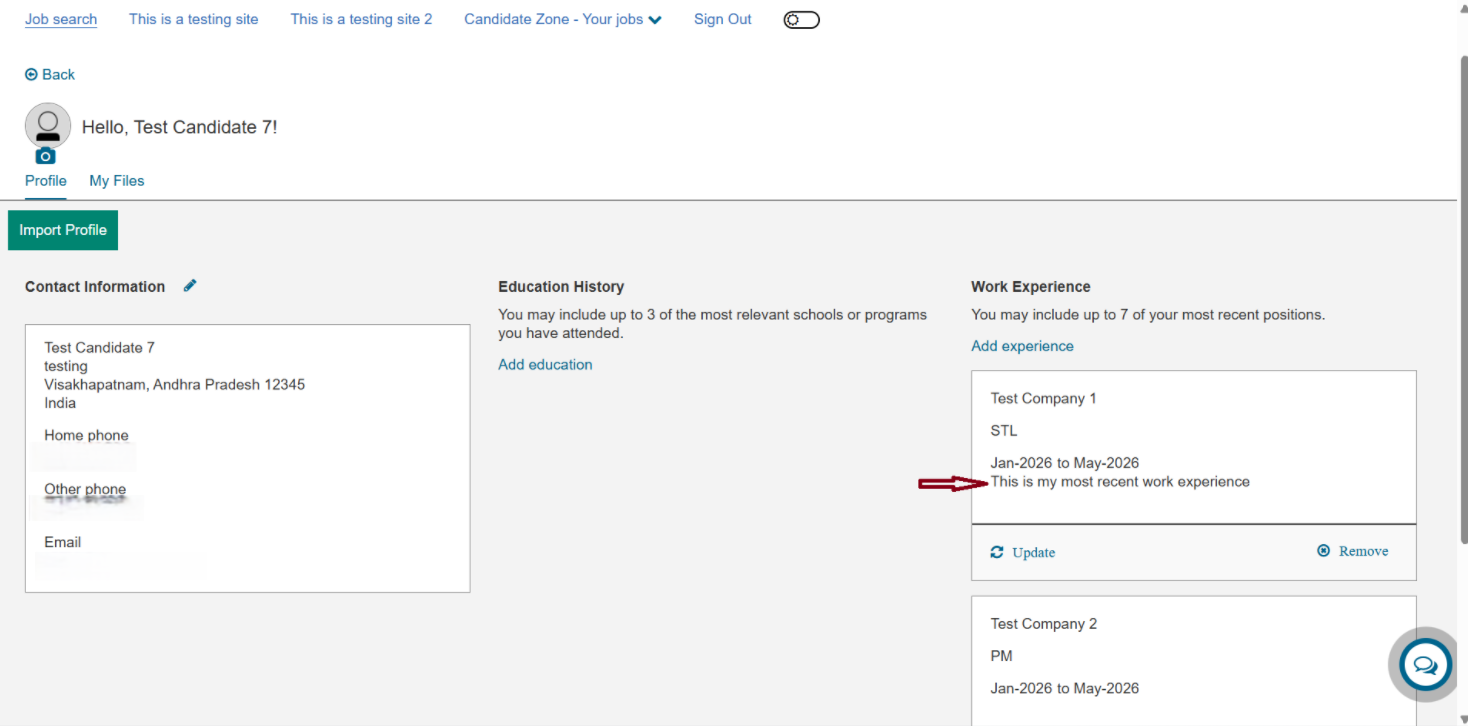
Currently, when a candidate marks any work experience as “Most Recent” while applying for a job or in their profile section on the Talent Gateway, they must manually uncheck the previous experiences if they want to mark a different work experience as “Most Recent.”
With this release, candidates can mark any work experience as “Most Recent,” and the system automatically ensures that only one experience is designated as most recent, eliminating the need for candidates to manually uncheck others.
Internal Reference Azure Board # 62979.
Workbench: Candidate Forms
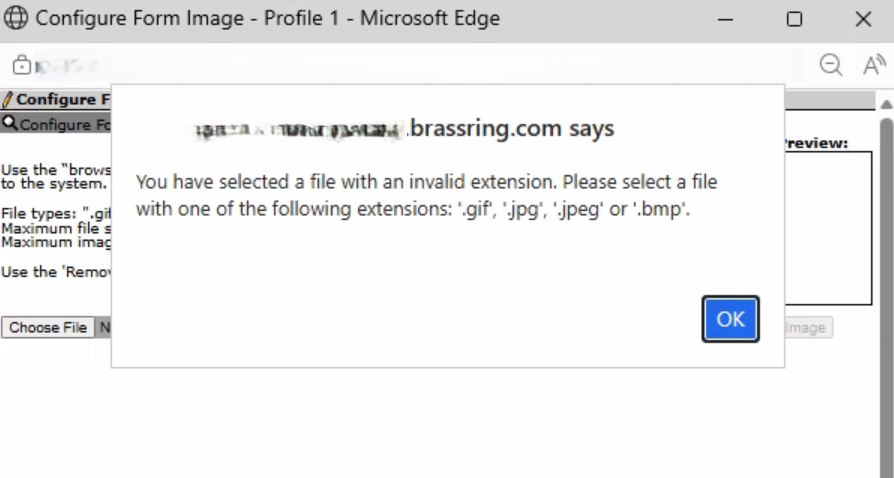
Unrestricted File Upload vulnerabilities can enable attackers to execute malicious code, compromising system security and allowing them to steal or manipulate sensitive data.
To address these vulnerabilities in this release, the system now displays a validation message when uploading files on the candidate form if the file name contains any of the following unsupported characters: “You have selected a file with an invalid extension. Please select a file with one of the following extensions: '.gif', '.jpg', '.jpeg' or '.bmp'.”
Path: Workbench >> Tools >> Forms >> Candidate Forms >> Edit >> Form Image >> Configure Image >> Select file and click Upload
Special Characters:
? (Question mark)
< (Less-than sign)
> (Greater-than sign)
\ (Backslash)
/ (Forward slash)
% (Percentile)
# (Hash)
* (asterisk)
Encoded Characters (not limited):
%252e (Double encoded dot)
%20 (Encoded space)
%2e (Encoded dot)
%00 (Null byte)
Unicode Dot Like Characters and Other invisible Characters:
file。doc
file.pdf
file․exe
file..txt (multiple dots)
Internal Reference Azure Board # 62891.
BRASSRING CONFIGURABLE CHANGES
There are no BrassRing configurable changes for the current release.
BRASSING WORKBENCH CHANGES
The Workbench-related configuration changes in the current release are mentioned in the Visible Changes section.